Nova.
A token-driven design system for an enterprise treasury dashboard.
Client
Cashflow
Role
Product Designer (Design Systems)
Surface
Web · Enterprise · Treasury
Process
- Audit
- System
- Tokens
- Frontend
- Accessibility
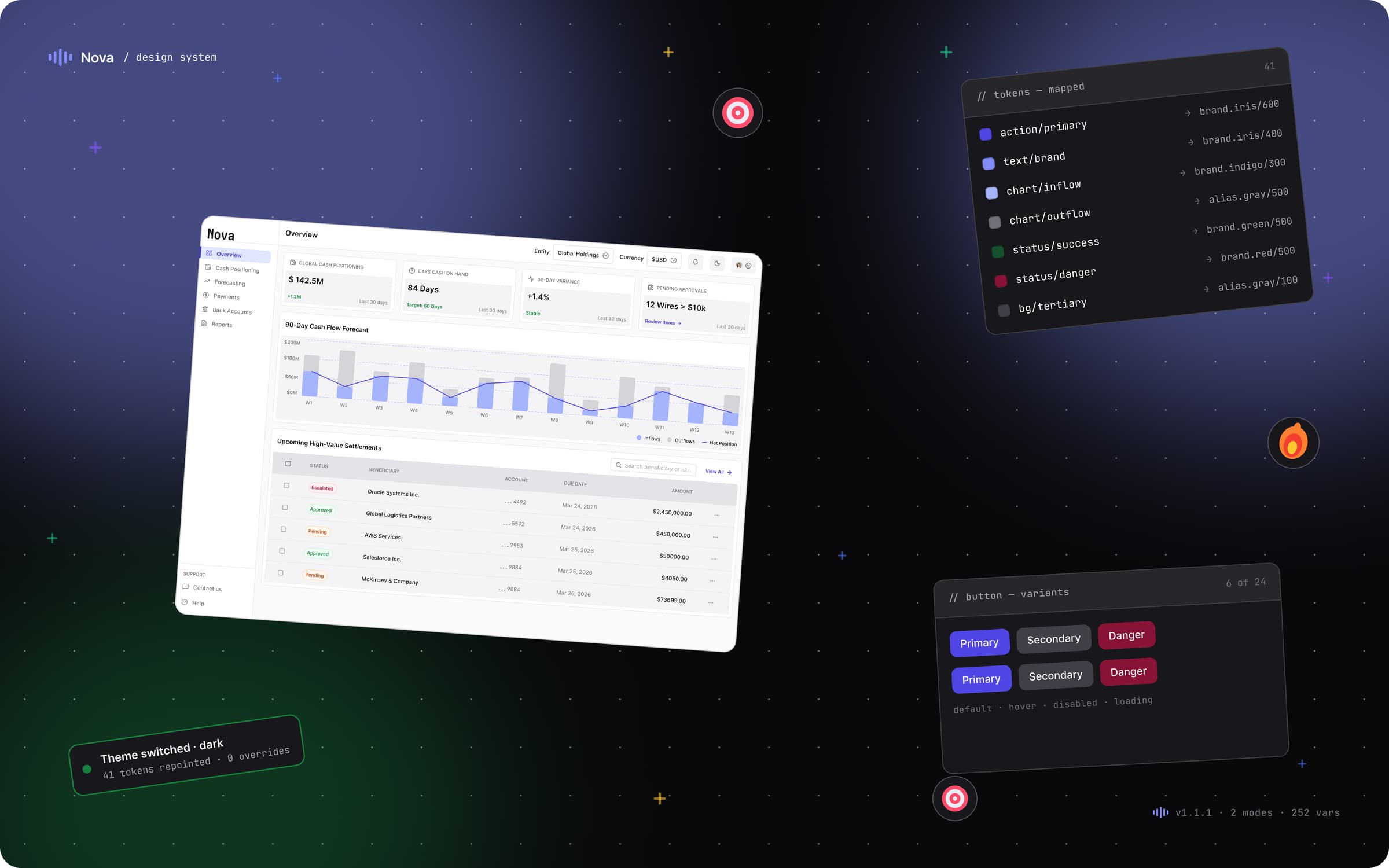
The arc · Point A → Point B
A — Where it started
A fragmented UI where every screen was built from scratch, causing endless design debt and engineering bottlenecks.
B — Where it landed
A 100% tokenized, 4-collection semantic graph that translates directly into production CSS, making future development frictionless.
What it moved
The numbers, in plain sight.
4
Variable collections
0
Total tokens
0
Components
0%
Token-bound accuracy
The story · 7 chapters
How Nova went from point A to point B.
The Catalyst
A simple brief hiding a structural crisis.
❝The initial brief was straightforward: 'Redesign the cashflow dashboard to make it look modern.' Our users—corporate treasurers—needed a high-density control center for managing global liquidity. But the moment I opened the files, I realized a visual facelift wouldn't solve the actual problem.
The underlying structure was chaotic. Every screen was practically hand-painted. Colors and spacing were re-decided on every single frame. Engineers were forced to manually copy and paste raw color values (hex codes) just to build a button. As a result, development was slow, and introducing a dark mode was considered technically impossible.
I realized that shipping a 'prettier' dashboard would just be putting a fresh coat of paint on a crumbling foundation. So, I rewrote the brief: we needed to build a scalable design system first, and the dashboard would simply be its first byproduct.
Pull-out · The Catalyst
Zero
Colour, Text styles, Stroke, Spacing system exist
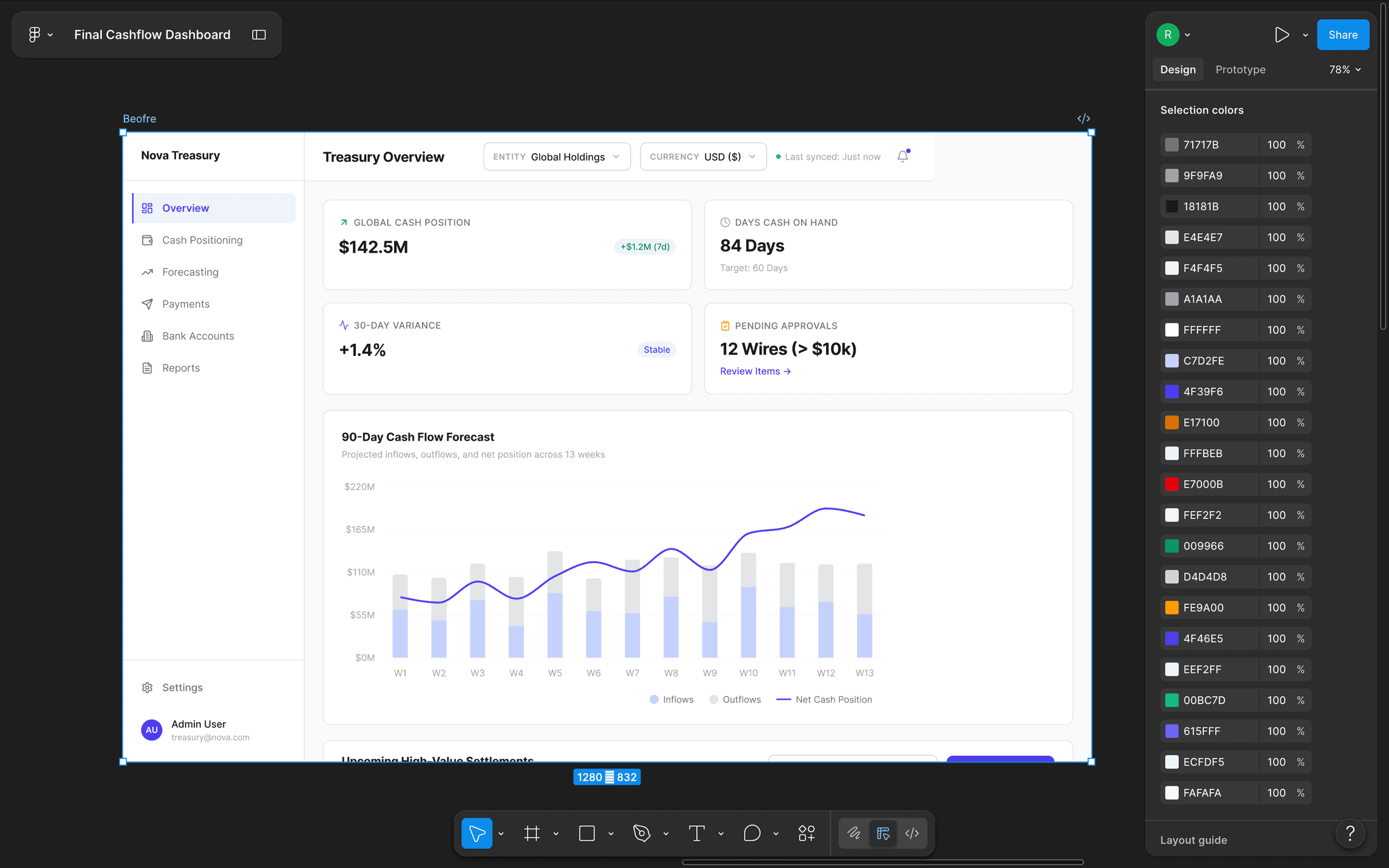
The final Cashflow Treasury dashboard inside Figma — and the long ‘Selection colors’ inspector beside it, the smoking gun that proved the old build had no color system at all.
The Diagnosis
Auditing the wreckage to find a baseline.
❝Before I could build anything new, I had to catalog the mess. I went through the existing application and mapped every single color, spacing unit, and component variant currently in use. I organized this audit into a master spreadsheet, tagging every element as 'keep,' 'deprecate,' or 'rebuild.'
The audit proved what I suspected: we didn't have a system; we had a folklore of design decisions that people just tried to remember. Worse, the engineering code reflected this chaos. I knew that whatever I built next couldn't just live in Figma—it had to translate perfectly into the CSS variables the engineers actually used.
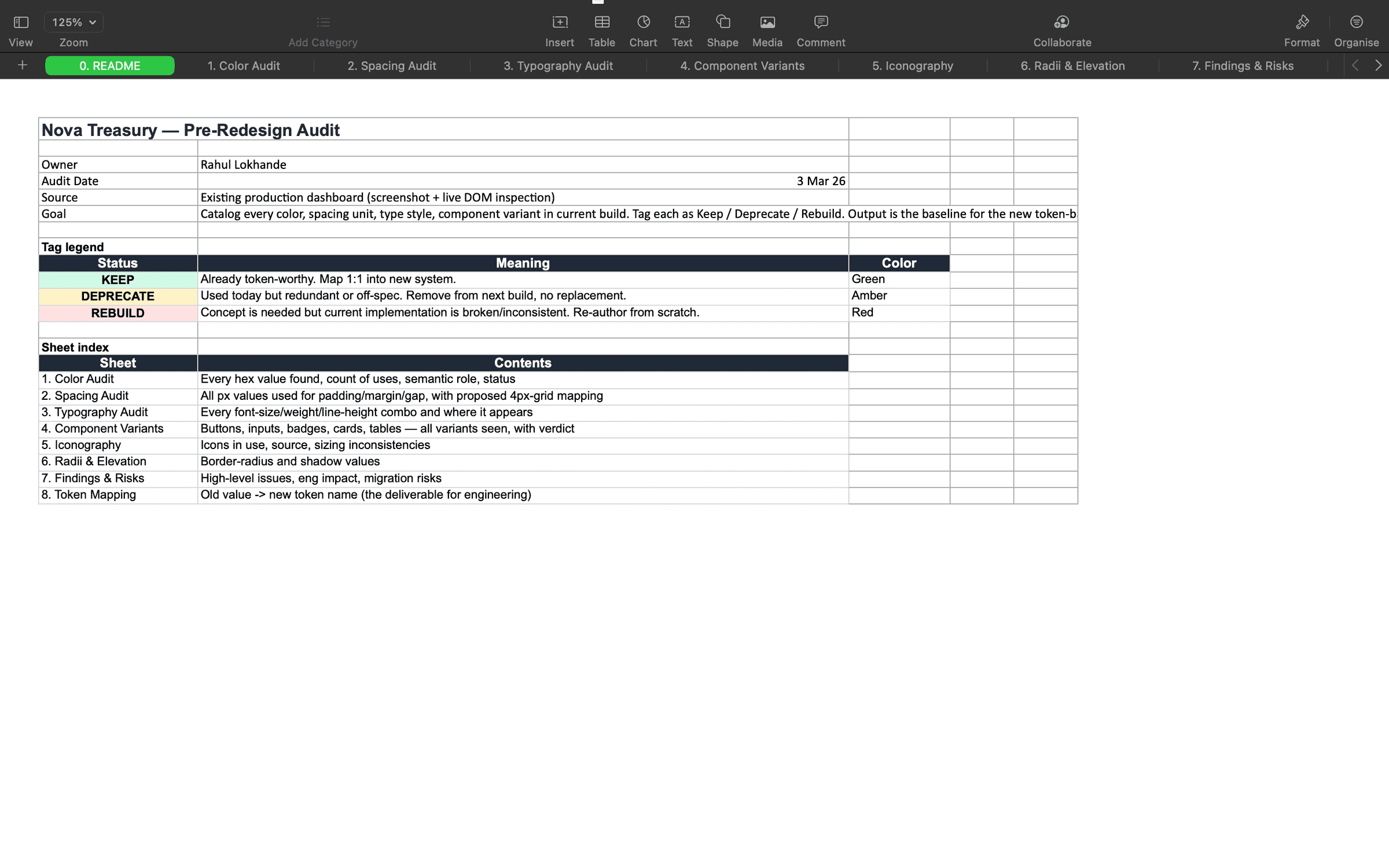
Audit README — every sheet pre-classified with a Keep / Deprecate / Rebuild status legend so stakeholders aligned on triage before any redesign work began.
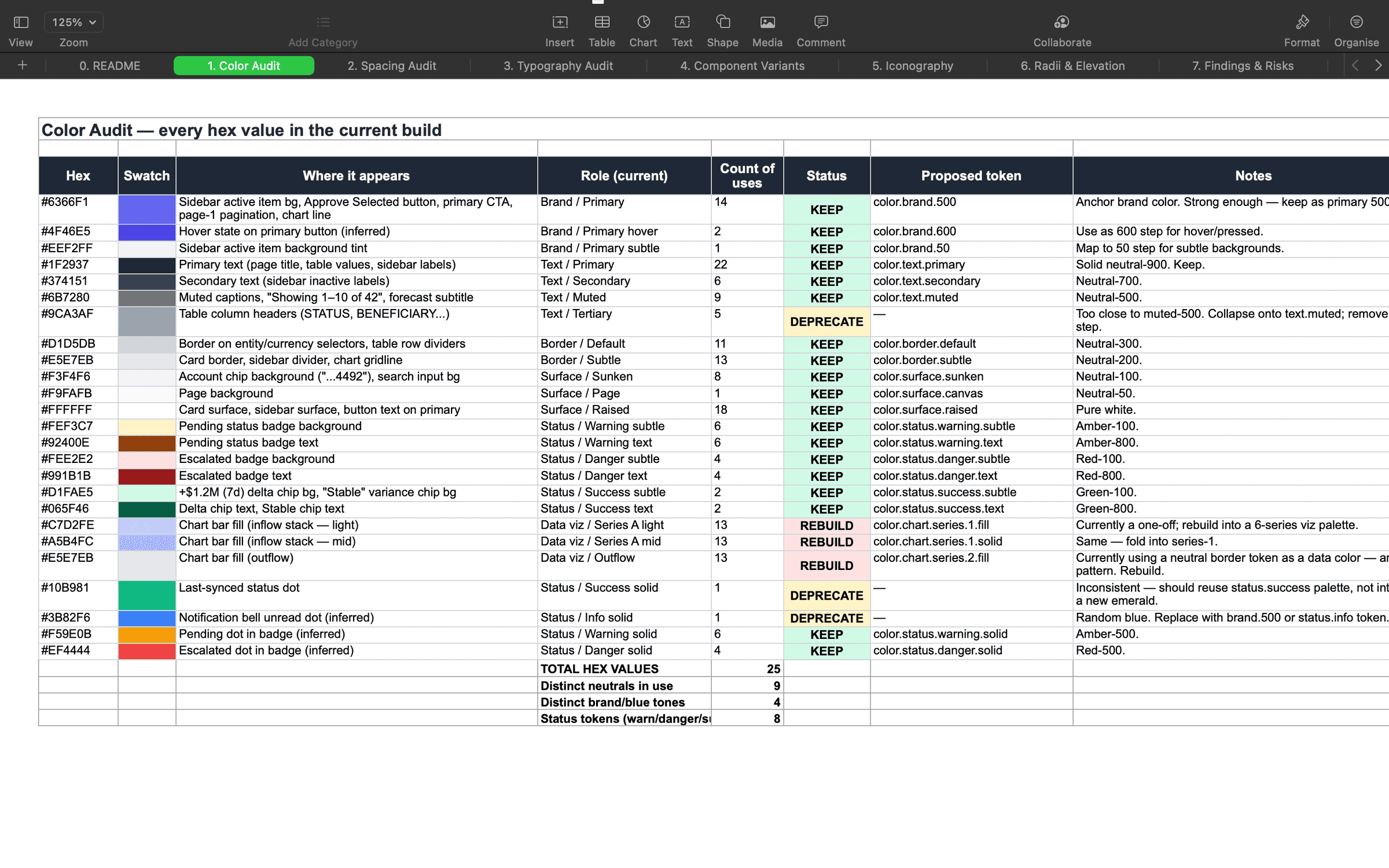
Color audit — every hex value in production logged with usage count, role, status, and a proposed semantic token, exposing duplicates and near-duplicate greys.
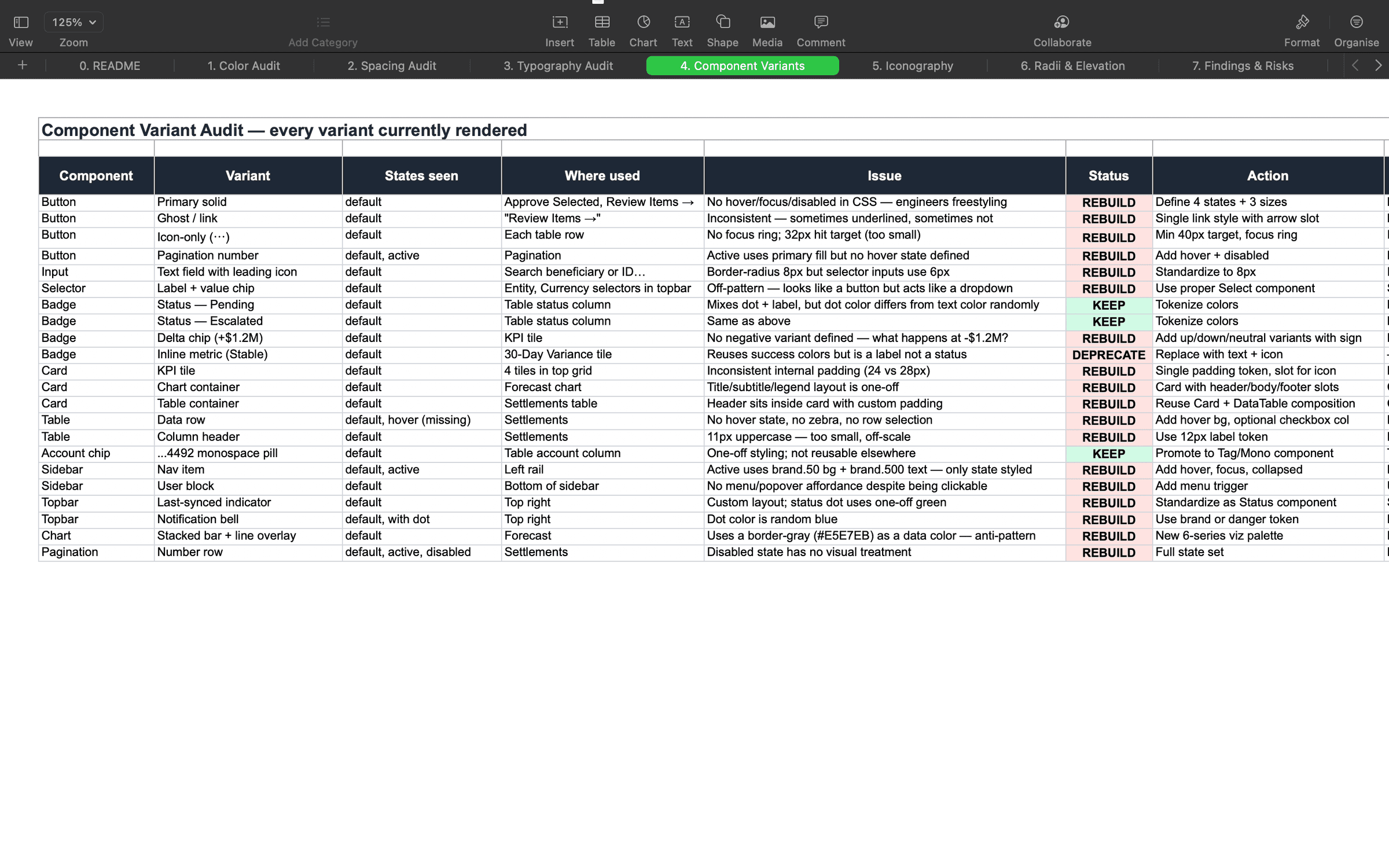
Component variant audit — every existing button, badge, table, and card variant catalogued with the specific defect that triggered a rebuild.
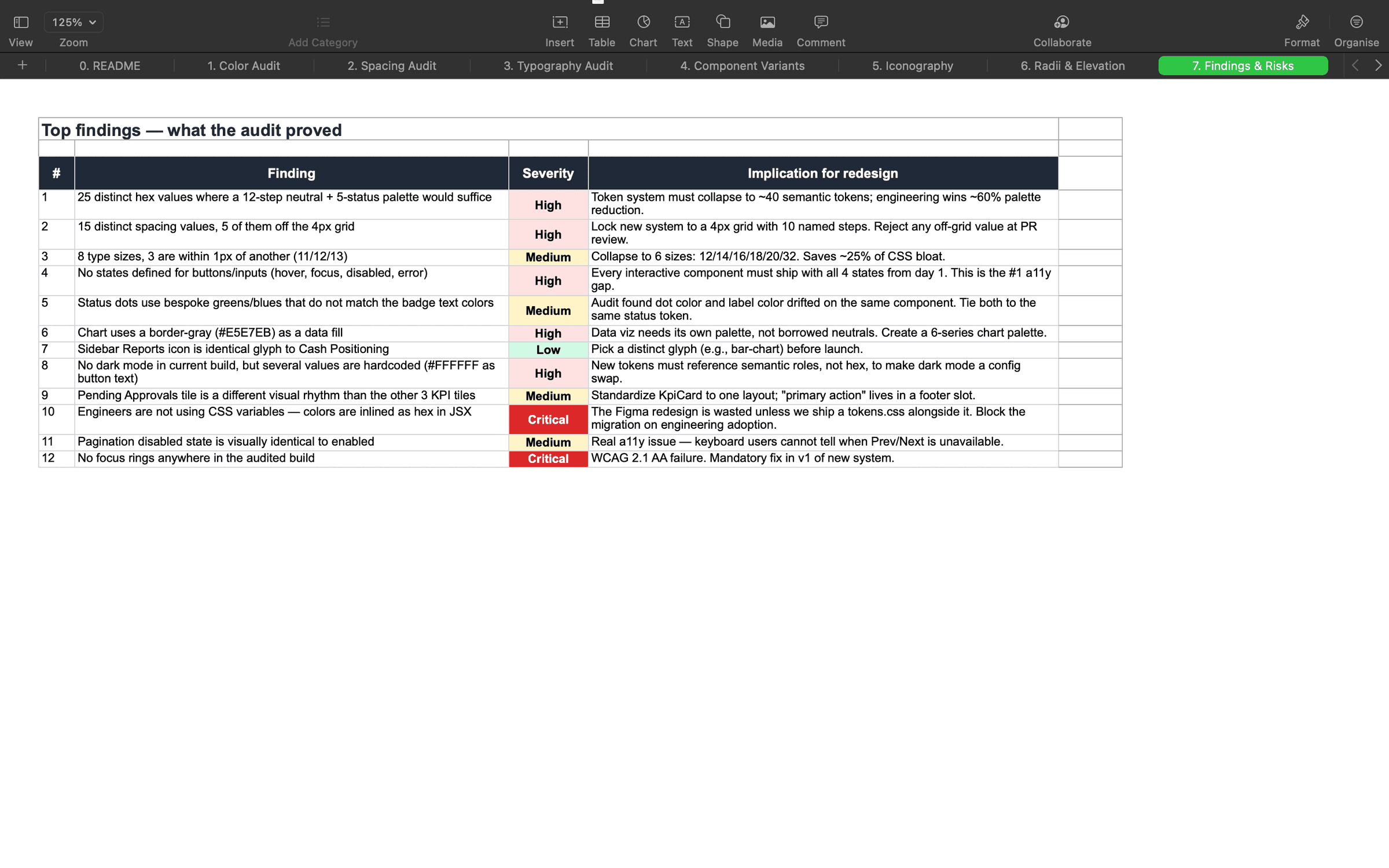
Findings & risks — the top 12 audit issues ranked by severity, each tied to a concrete implication for the new token architecture.
The Architecture
Treating design like a language, not a paint set.
❝Most teams fail at design systems because they stop at step one: they name a blue color 'Brand/Blue' and call it a day. But the day the company rebrands to purple, or wants a dark mode, the whole system breaks because 'Blue' is no longer accurate.
To future-proof the product, I designed a three-tier semantic graph. First, 'Primitives' (the raw colors we have). Second, 'Aliases' (the roles those colors play, like 'Primary'). Finally, 'Semantic' (where the color actually lives, like a button background).
This meant a button was no longer defined by a raw hex code like #4F46E5. It was defined by its intent: 'action/primary/bg'. By focusing on intent rather than raw values, updating the UI across the entire platform became as simple as flipping a switch.
Pull-out · The Architecture
3 tiers
Primitive → Alias → Semantic
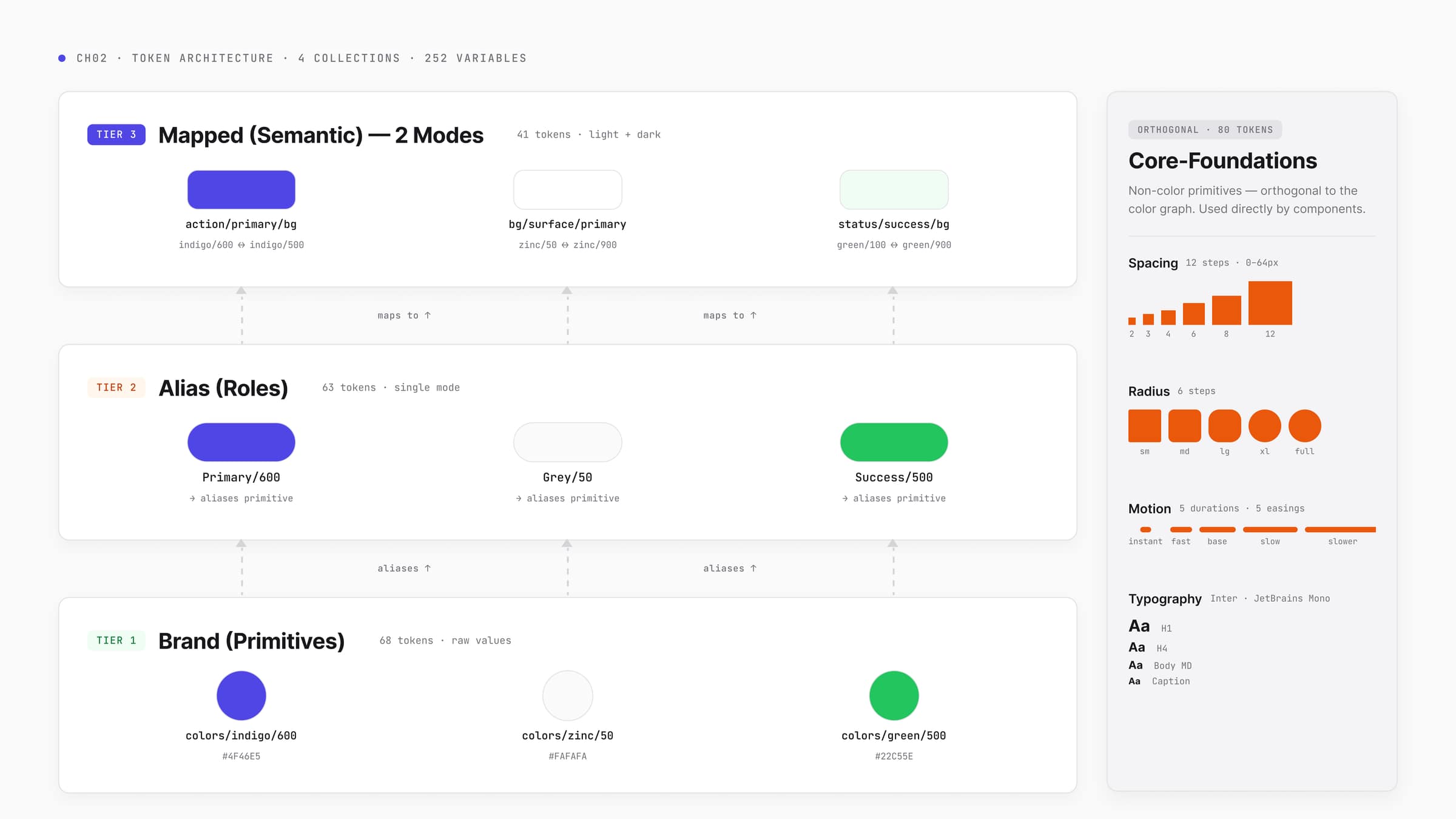
Primitives → Aliases → Mapped Semantic — three tiers wired through one diagram, with the orthogonal Core-Foundations (spacing, radius, motion, type) sitting outside the color graph.
The Guardrails
Building fences so nobody falls off the cliff.
❝With the architecture mapped, I built the engine in Figma. I deliberately split the system into four separate collections: Brand, Alias, Mapped, and Core-Foundations (spacing and sizing). This separation was about blast-radius control—if we changed a spacing rule, it wouldn't accidentally break our color themes.
More importantly, I locked down the tools. In Figma, I scoped the variables so a designer couldn't accidentally apply a text color to a background frame. By restricting what tools were available in specific contexts, the design software became a set of guardrails. It actively prevented mistakes before they could be handed off to engineering.
Pull-out · The Guardrails
231
Strictly scoped design tokens
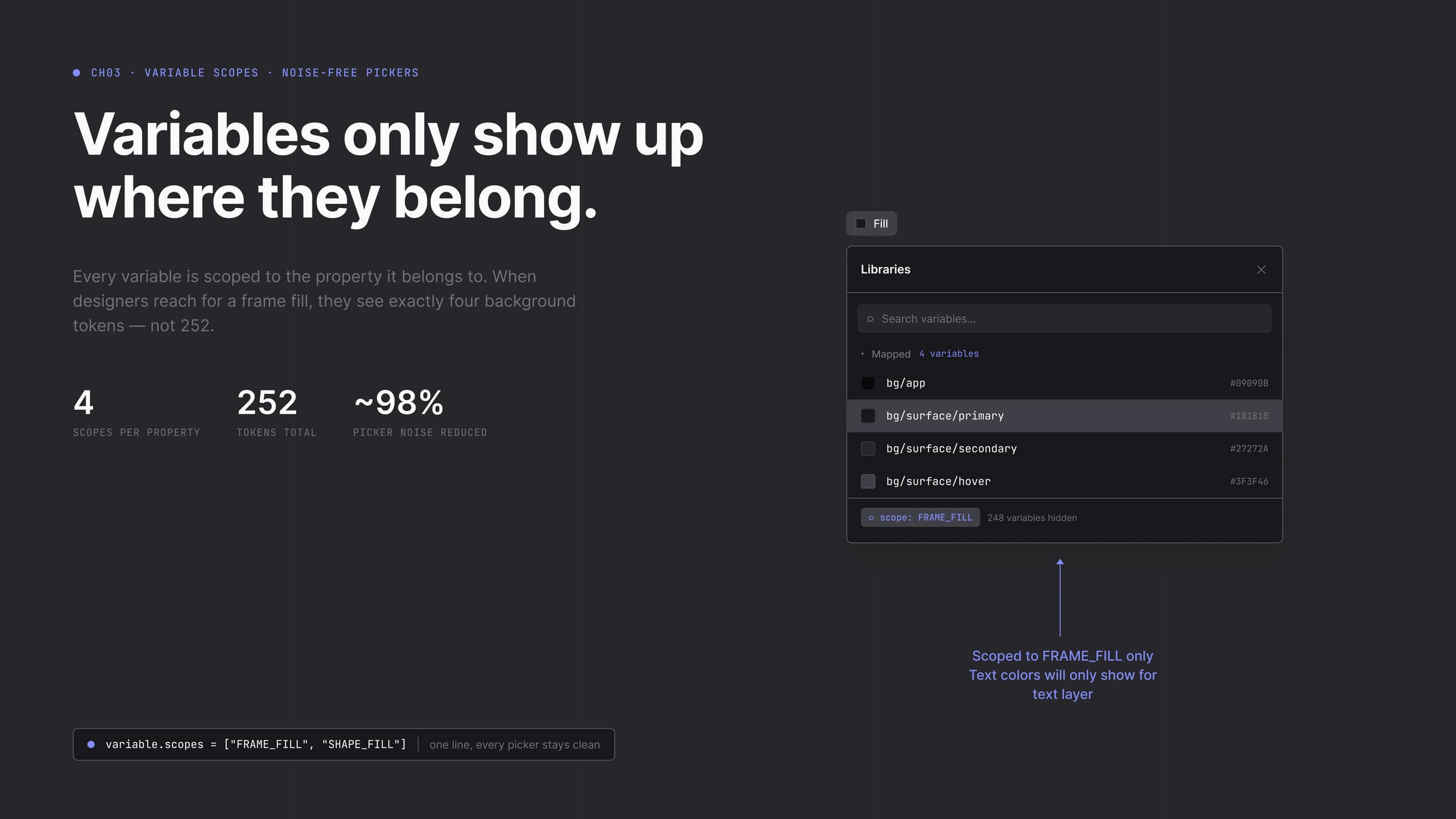
FRAME_FILL scope in action — when a designer reaches for a frame fill they see four background tokens, not 252; 248 irrelevant variables are hidden by design.
The Components
Leaving no room for guesswork at midnight.
❝With the foundation rock solid, I systematically built out the component library: 47 distinct components ranging from complex data tables to navigation elements.
The crown jewel was the button system. I built a 60-variant matrix—factoring in every size, intent, and interactive state (hover, focus, disabled). I didn't do this because the dashboard needed 60 buttons right now; I did it so an engineer working late at night would never encounter a missing state or have to guess how a button should look when disabled.
Every single component was bound 100% to our semantic tokens. There were absolutely zero raw color values left on the canvas. Because of this strict token binding, 'Dark Mode' didn't require designing new screens—it just naturally worked.
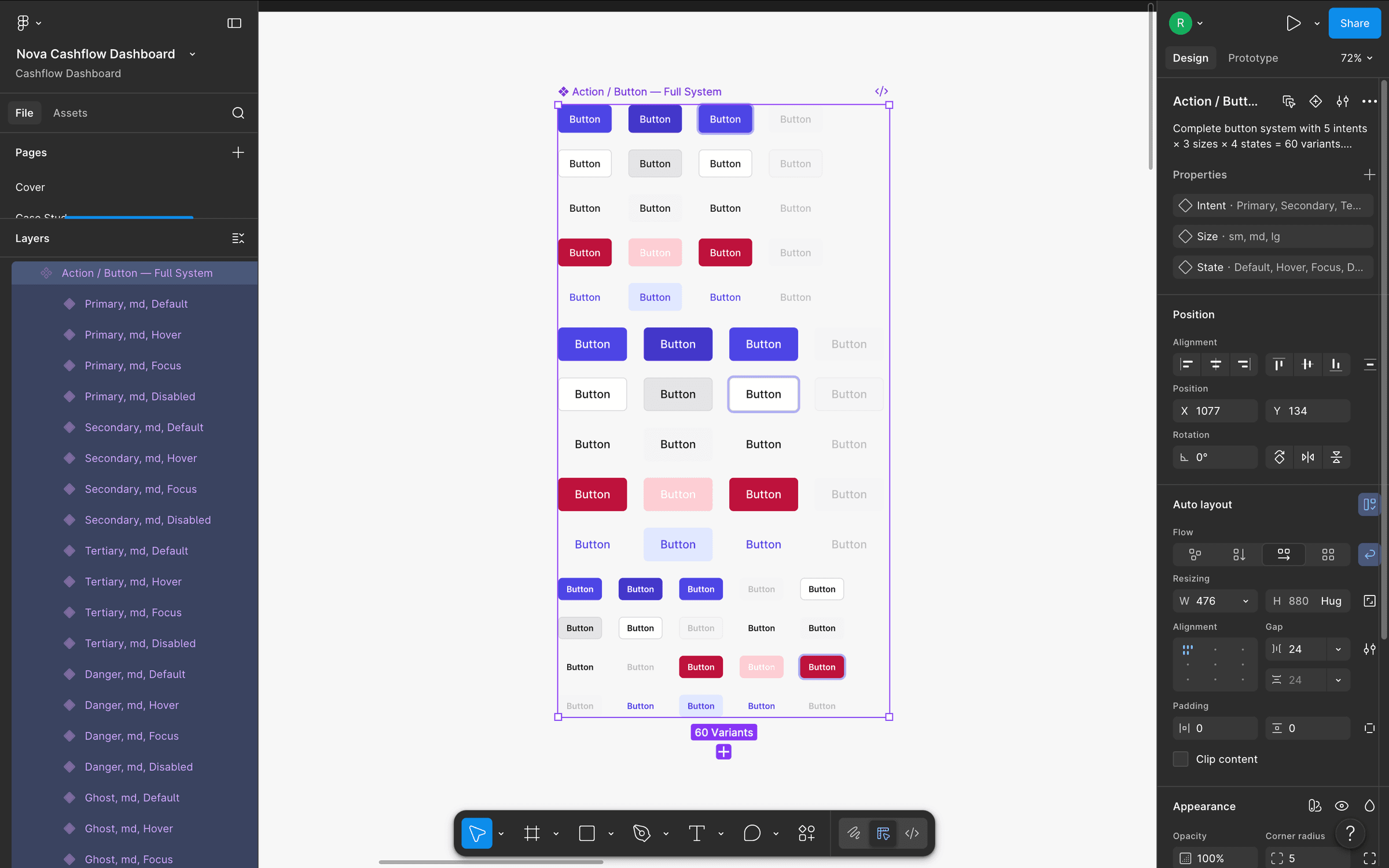
The 60-variant Action/Button component set in Figma — every intent × size × state pairing pre-rendered so an engineer on a Friday-night ticket never has to design a missing combination.
The Handoff
Bridging the gap between Figma and code.
❝The true test of a design system is how easily it leaves the designer's hands. The final deliverable wasn't just a pretty UI; it was a comprehensive documentation suite. I created an engineering handoff document that mapped every single Figma token directly to its production CSS variable.
Because we had eliminated raw hex codes, the translation from design to code was 1:1. When I used `bg/surface/primary` in Figma, the engineer just typed `var(--bg-surface-primary)` in their CSS.
Accessibility was baked right into these tokens, ensuring we automatically hit WCAG 2.1 AA contrast standards. Ultimately, I handed over a foundation that empowered a six-engineer team to build the next twenty dashboard screens rapidly, reliably, and entirely without my supervision.
Pull-out · The Handoff
1:1
Figma to CSS code parity

Foundations handoff page — palette, semantic scales, spacing, radii, typography, motion, density, breakpoints, accessibility, and a token naming rationale, all in one engineering-facing surface.
Hindsight
What worked, and what I'd do differently.
❝The decision I'm proudest of is holding the line—refusing to ship a superficial dashboard redesign without building the structural system underneath it first. It turned a two-week visual patch job into a scalable asset for the entire company.
If I were to do it again, I would have integrated motion and animation tokens into the core foundations from day one, rather than pushing them to a later sprint. My immediate next step for the platform is implementing Code Connect, which will map our Figma components directly to their React counterparts, closing the loop entirely between design and engineering.
02. A scalable design architecture that bridged the gap between Figma and code. 231 tokens, 47 components, and a foundation a six-engineer team can ship against without me in the room.
Want this kind of work on your team?