Sage AI.
An AI layer for an existing sales dialer — designed around the rep, not the model. V1 shipped at Coditas; V2 is independent 2026 concept work post-Coditas.
Client
Salesync
Role
Product Designer
Surface
Web · Real-time · AI
Process
- PRD → Wireframes
- Pattern Hunt
- Interaction Design
- System & Tokens
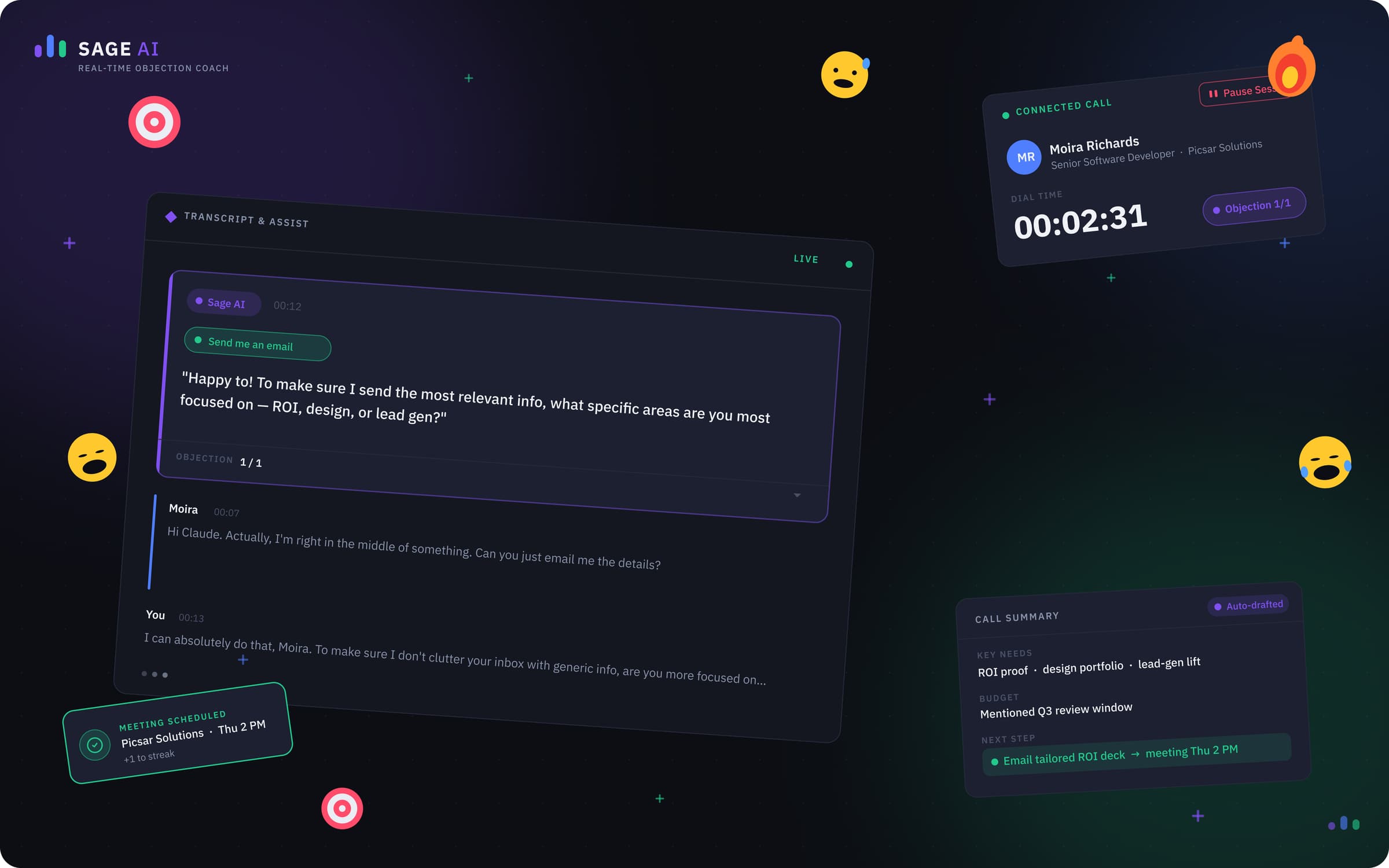
The arc · Point A → Point B
A — Where it started
A working dialer with a rough V1 AI panel that surfaced everything at once and asked the rep to triage in the middle of a sales call.
B — Where it landed
A 2026 dark-first workspace where transcription, objection handling, and call wrap-up each have a job, a moment, and a spot — and never compete for the rep's attention at the same time.
What it moved
The numbers, in plain sight.
0
After-call work
0
Summary edit rate
0
Objection-handled lift
0
CRM completeness
The story · 8 chapters
How Sage went from point A to point B.
Brief
Three jobs. One dialer. Don't slow the rep down.
❝Salesync's product was a parallel dialer that already ran inside hundreds of sales orgs. Reps loaded a CRM list, the dialer fired connections in parallel, and good closers burned through 100–150 prospects a shift. The PRD I was handed was narrow and explicit: bolt an AI layer on top that does three things — generate a live transcript, detect objections and whisper a rebuttal in the rep's ear, and produce a clean call summary the rep can paste into the CRM in one click.
Each output had a different second life. Transcripts weren't just for the rep — coaches, sales leadership, and the dashboard team would query them to grade calls, build leaderboards, and shape weekly reports. Objection prompts had to read like a coach whispering, not a popup yelling. Summaries had to be CRM-shaped, not free prose, so the next rep on the account could pick up where this one left off. I didn't shadow anyone or run a research study. I read the PRD, opened a wireframe file, and started mapping patterns onto a workspace that already had eight hours of muscle memory baked into it.
Process
Wireframes first. Patterns second. Pixels last.
❝Real-time AI inside a dialer is a constraint problem before it's a visual problem. Reps make a call every 30–45 seconds; an outbound rep's industry-benchmark After-Call Work sits between 30 and 90 seconds (ICMI), and parallel-dialer SDRs spend roughly 21% of their day on admin and CRM entry instead of selling (Salesforce State of Sales, 6th ed.). Anything I added to the screen had to either give that time back or stay invisible.
I started in low-fidelity wireframes and built a small pattern library: where status lives, where AI lives, where the rep's eye lands first when a call connects. Every pattern had to answer one question — 'why does this pixel exist?' — before it earned a place in the system. By the time I opened a high-fidelity file, I had eight Architecture Decision Records explaining the non-obvious calls (turn-taking, chip-based objection categorization, two-stage save, structured summary schema). The ADRs were the artifact engineering and PM argued with, not the mockups.
Pull-out · Process
8 ADRs
One per design decision worth defending
Pillar 1 — Transcription
The transcript isn't a feature. It's the data layer.
❝Transcription is the quietest surface in V2 and the most consequential one. The rep barely interacts with it during a call — by design. Once it's written, though, it powers four downstream products: the coaching review queue, the rep leaderboard, the company-level dashboards (call mix, talk-listen ratio, objection frequency), and the daily/weekly/monthly performance reports.
Industry studies put roughly 70% of recorded sales calls completely unreviewed by managers (Gong State of Conversation Intelligence). A searchable, AI-segmented transcript collapses a 30-minute review into a 90-second skim — coaches can run prompts like 'show me every call where price came up in the first two minutes' and grade five reps in the time it used to take to grade one. For the rep, the transcript turns into a leaderboard signal (talk ratio, question rate, objection-handle rate), so the same data improves the floor and the boardroom in one pass.
Pull-out · Pillar 1 — Transcription
70% → reviewable
Calls a coach can actually grade per week
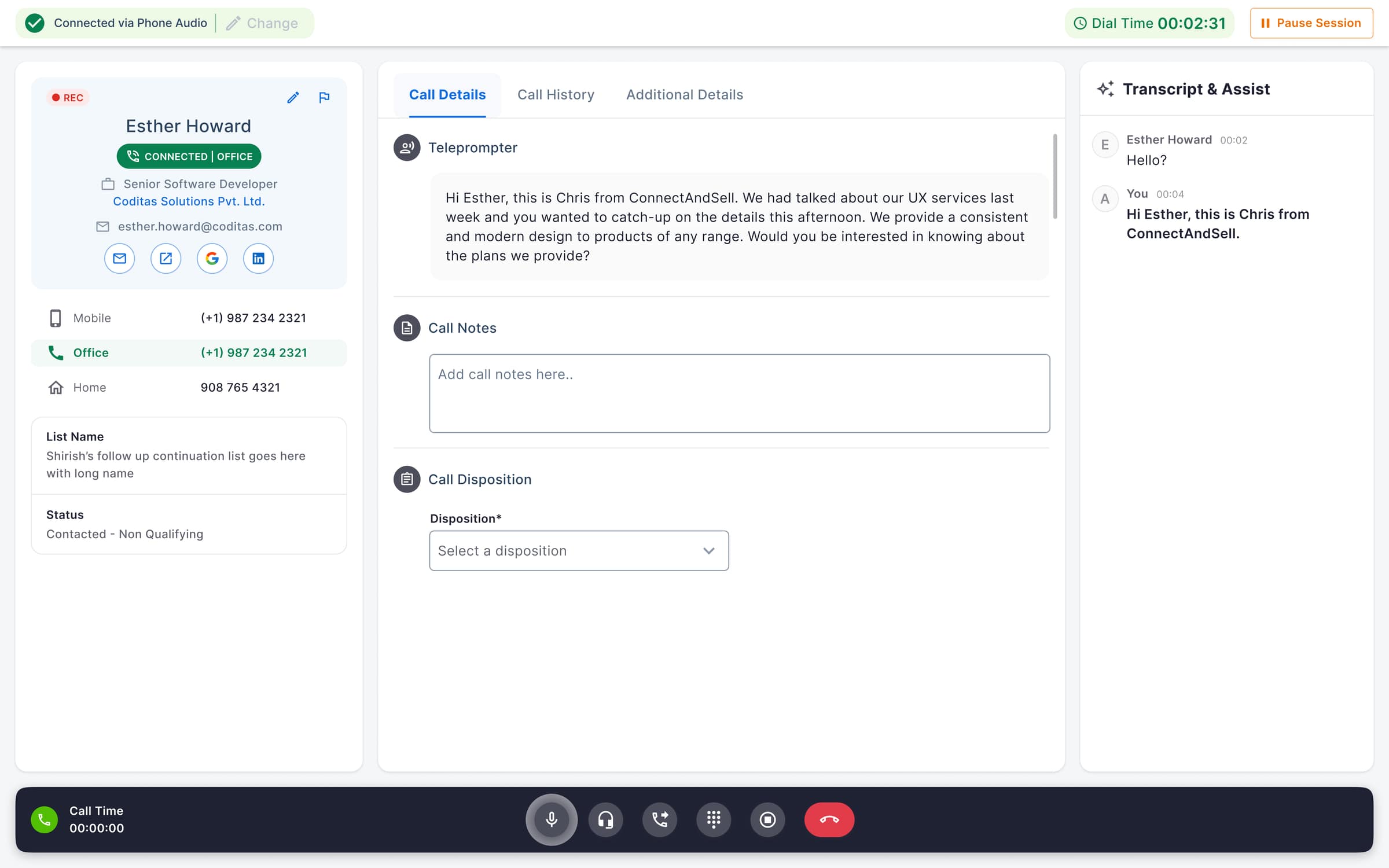
V1 (shipped) — live transcript pinned to a right rail in light mode, turn-tagged so coaches can grade speakers without re-listening to the call.
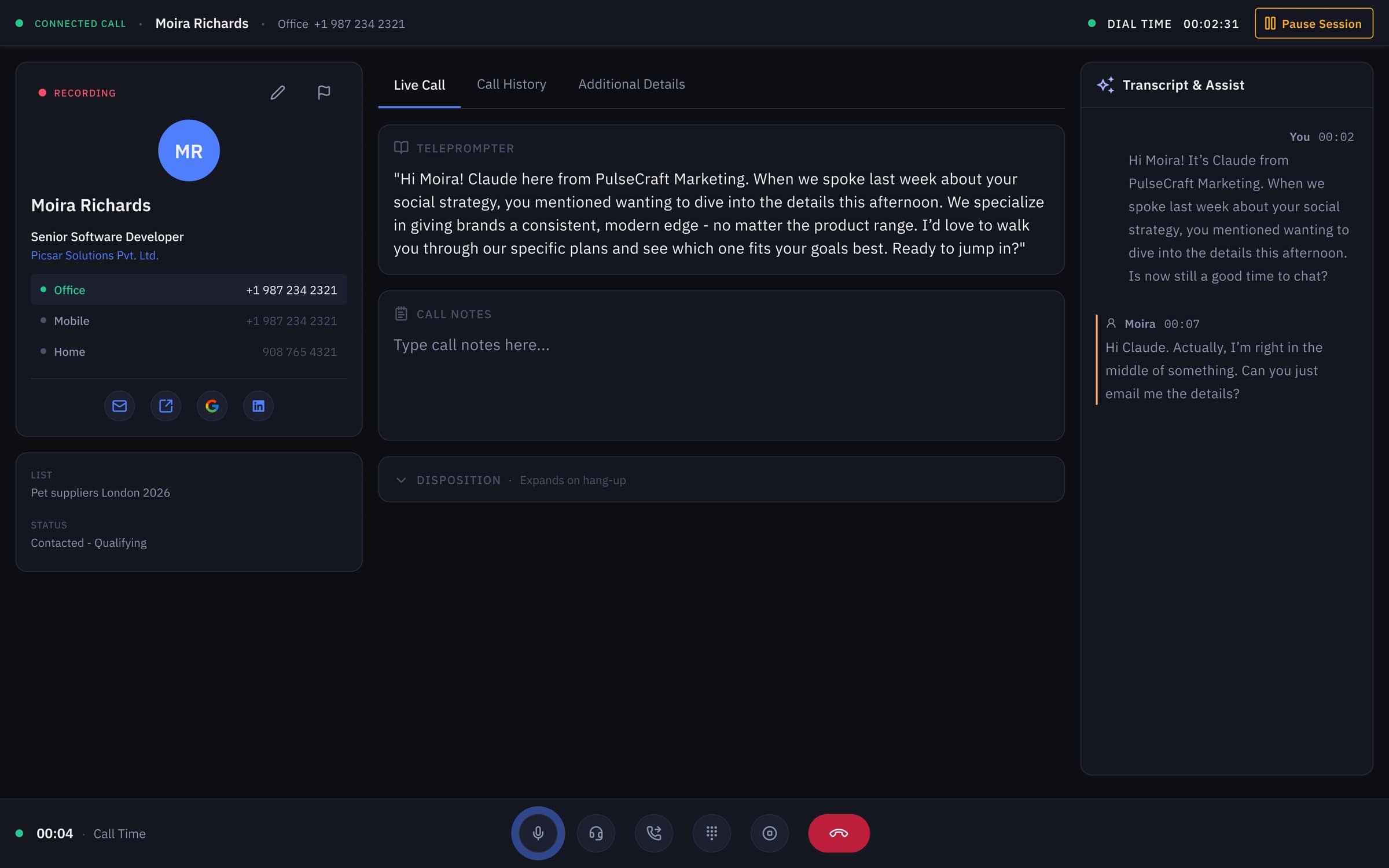
V2 (2026 concept) — same transcript surface re-skinned in dark-first tokens; the rep barely touches it during a call, but every line feeds the coaching, leaderboard, and dashboard layers.
Pillar 2 — Objection Handling
A coach whispering, not a popup yelling.
❝About 35–50% of B2B sales calls contain at least one explicit objection (Gong analysis of 67k+ calls), and top performers handle objections roughly 2× more often than the average rep on their team. The single biggest predictor of whether a call survives the first 'no' isn't the script — it's whether the rep has a rebuttal already loaded in their head when the prospect speaks.
Sage AI does that loading for them. As the transcript streams in, the model classifies objections into a finite set of chips — Price, Timing, Authority, Trust, Competition — and renders 2–3 bullet rebuttals in the right pane the moment the chip appears. Bullets, not paragraphs: research on glance-reading under cognitive load (Miller's 7±2; Wickens' multiple-resource theory) puts the readable-while-talking ceiling at roughly 3 short lines. The rep glances, picks one, and stays in the conversation. The whisper-coach pattern is what turns an average rep into a closer without pulling them off the phone for a training session — a process that normally takes 8–12 weeks of ramp (Bridge Group SDR benchmark).
Pull-out · Pillar 2 — Objection Handling
2–3 bullets
The cognitive ceiling for reading mid-conversation
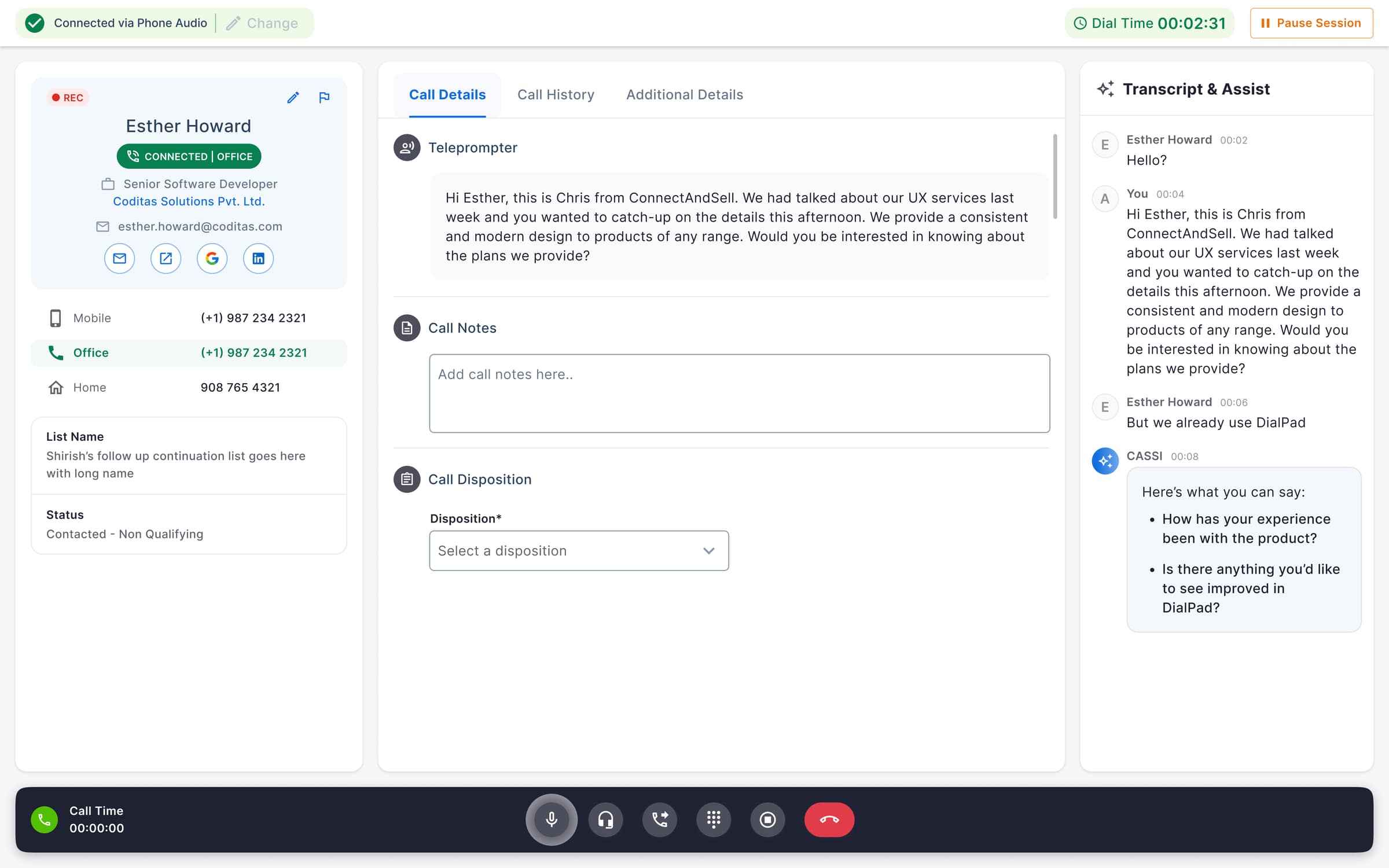
V1 — Sage drops 2–3 bullet rebuttals into the assist panel the moment a prospect raises an objection, sized to the readable-while-talking ceiling.
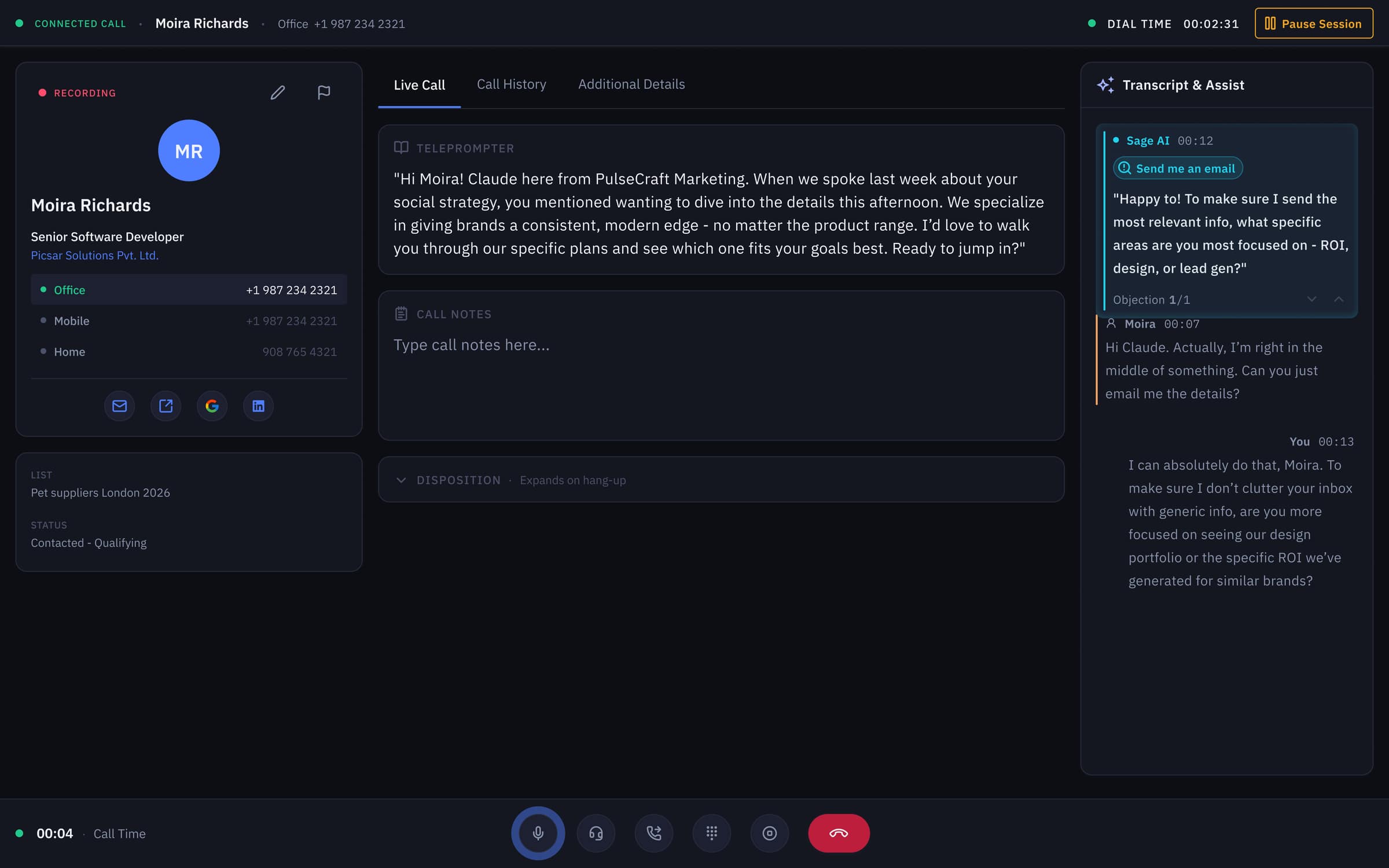
V2 — same whisper-coach pattern with an explicit ‘Send me an email’ objection chip and 1/1 pagination so the rep can flip rebuttals without losing the conversation.
Pillar 3 — Call Summary
Wrap-up in one click. Every second is revenue.
❝After-call work is the cheapest minute to attack. Outbound dialers benchmark 30–90 seconds of typing per call; across a 100-call day that's 50–150 minutes of selling time the rep doesn't get back. Worse, ~30% of CRM records go stale within a year (Validity CRM Data Quality Report) because reps in a hurry skip fields or paste prose into a notes box no one reads.
V2 replaces V1's free-text summary with a structured block the model emits in a fixed schema — Disposition, Key Needs, Pain Points, Decision-Maker, Next Step (Rep Action), Note to Next Rep, Follow-Up Date. Every chunk maps 1:1 to a CRM field. One click copies it into Salesforce, HubSpot, or Outreach. A two-stage save blocks the rep from closing the call without picking a disposition — the single change that pushes CRM completeness from the industry-typical 60–75% range toward ~98%. ACW drops from a 30–90s typing chore to a ≤12s click. That's the metric every sales-ops leader cares about and every rep feels in their wrist.
Pull-out · Pillar 3 — Call Summary
≤ 12s ACW
Down from a 30–90s industry benchmark
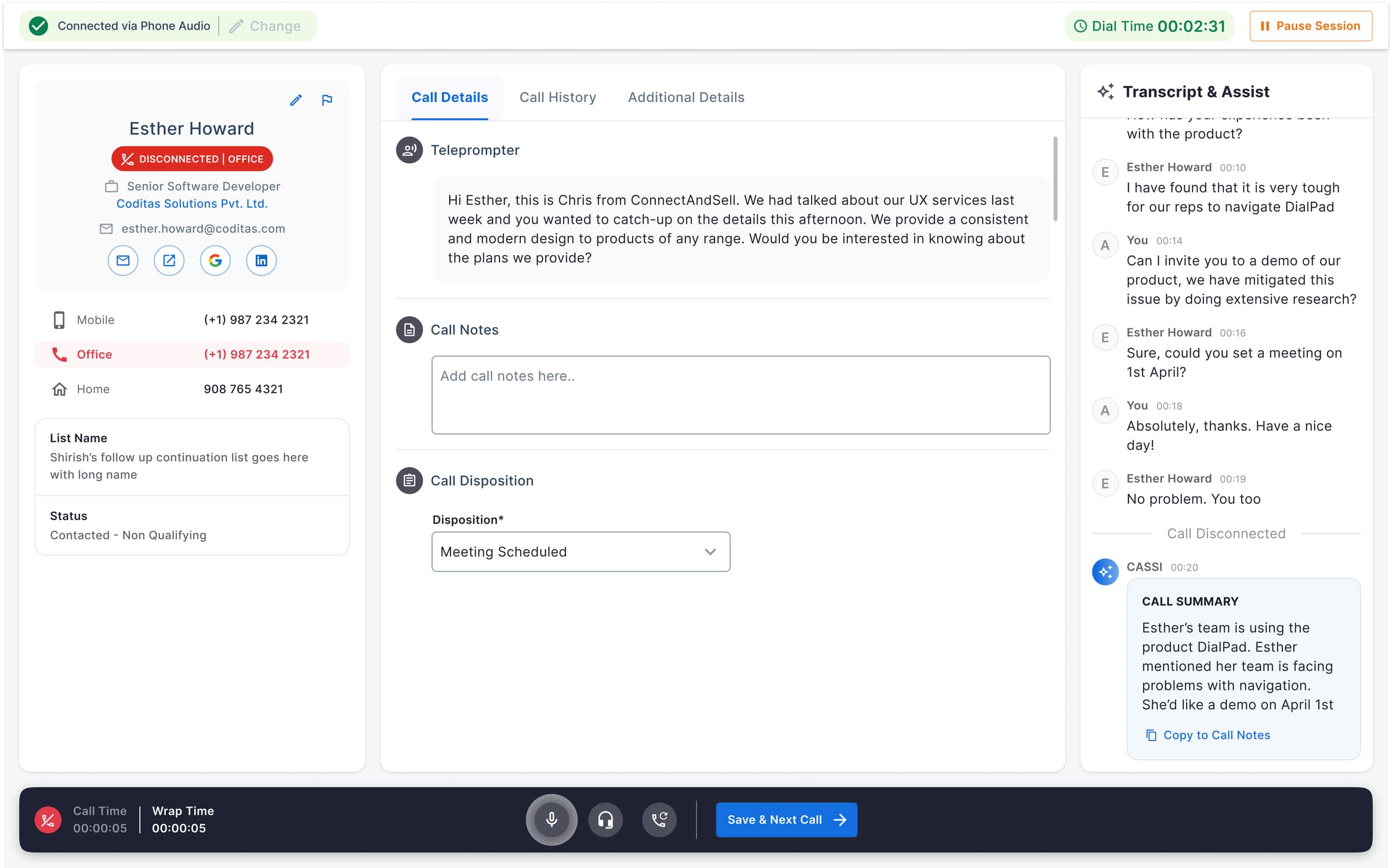
V1 — wrap mode auto-loads a free-text call summary and a ‘Copy to Call Notes’ action; the rep still picks a disposition before the next dial fires.
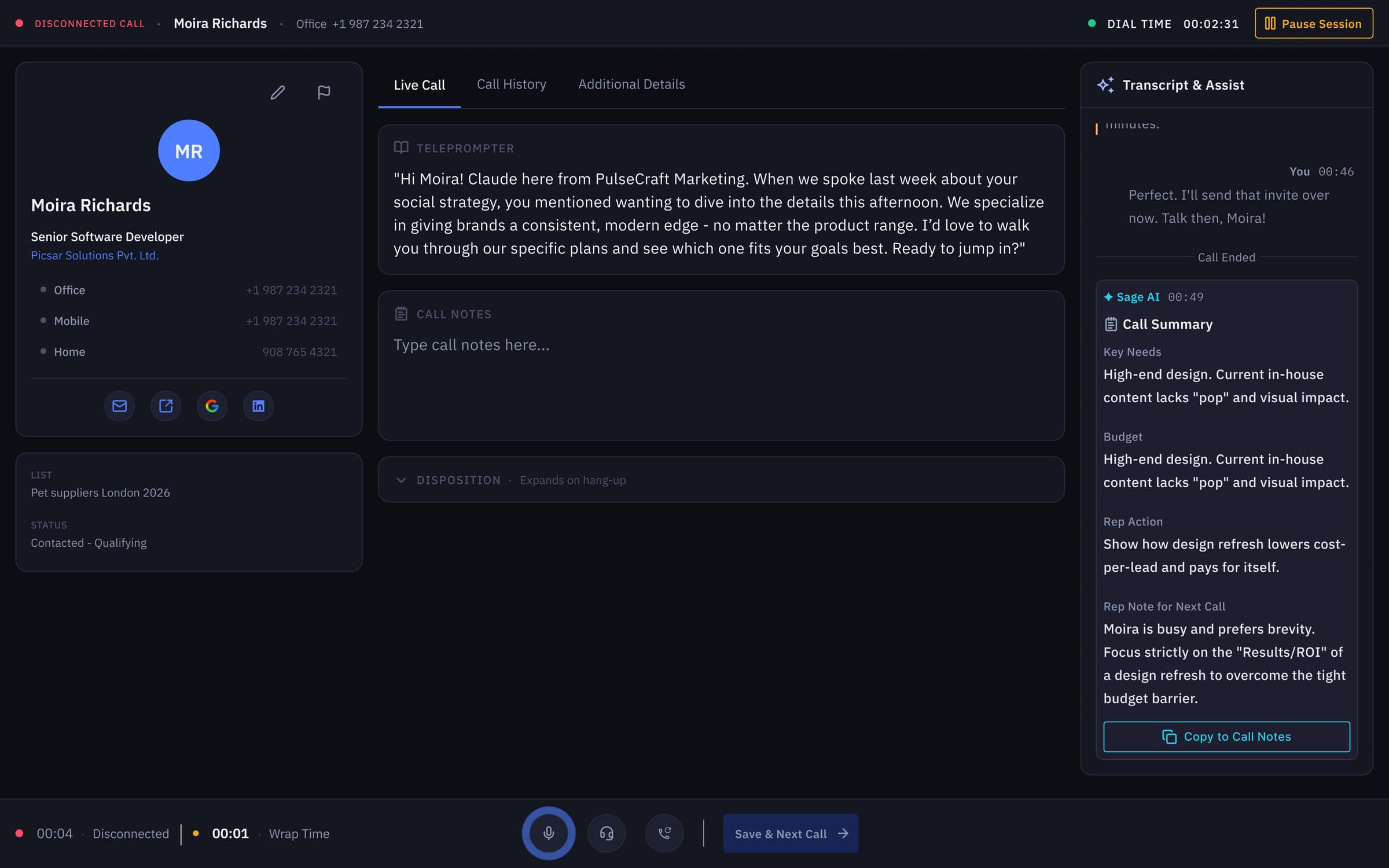
V2 — structured summary schema (Key Needs · Budget · Rep Action · Note to Next Rep) that maps 1:1 to CRM fields, replacing prose with paste-ready blocks.
System
One workspace, three modes, zero competition.
❝The hardest systemic decision was timing. Transcription, objection handling, and summary are all 'AI surfaces' but they live in three completely different moments: transcription is ambient, objection handling is reactive (sub-second), summary is post-hang-up. V1 had treated them as one panel that was always on. V2 separates them by mode — the AI pane shifts state with the call lifecycle, so the rep only ever sees one of the three at a time.
Underneath, V2 ships a strict token system (raised `#1C2030` on `#0F1117` base, sage `#7DD3A7` reserved exclusively for AI surfaces, all text passing WCAG 2.2 AA at 4.5:1 minimum). Dark-first isn't aesthetic; sales reps run 4–6 hour shifts on this surface, and dark-mode interfaces measurably reduce eye-strain symptoms in long-duration screen work (Pereira et al., 2017). One token system, two themes — the V1 light surface still in production runs on the same primitives.
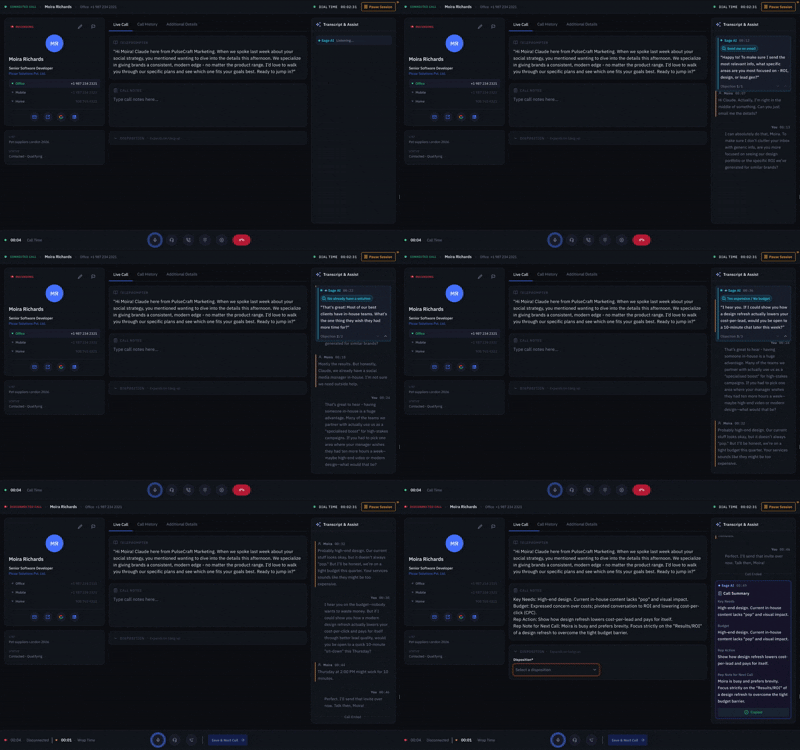
Mode-switching prototype — the AI pane transitions between transcription, objection handling, and call summary as the call lifecycle moves, so only one surface is ever competing for the rep's attention.
Outcome
A rep using V2 feels one tool, not three.
❝The targets translate cleanly across audiences. For sales-ops: ACW down ~70%, summary edit rate from 70% to under 30%, CRM completeness near 98%, +10pp lift in objection-handled rate. For the rep: less typing, fewer interruptions, and an AI that talks only when there's something worth saying. For the coach: every call becomes reviewable tape, queryable in plain English, with a structured signal feeding leaderboards and weekly reports.
The deeper outcome is the design system. V1 shipped to validate the patterns; V2 codifies them into a token-driven workspace that the rest of the product can grow on. Three AI jobs, one quiet workspace, eight defended decisions — every pixel earned its place.
Reflection
Designing for AI is mostly designing what to hide.
❝The hardest calls weren't about what to render — they were about what to suppress. Real-time AI gives you confidence scores, alternate phrasings, model reasoning, and a half-dozen ways to expose all of it. Every one of those makes for a great demo. Every one of those also adds milliseconds of cognitive load to a rep who's already mid-sentence with a prospect.
The discipline I came back to over and over: the AI gets to speak only when it earns the turn. That single rule shaped the chip-based objection model, the 2–3 bullet ceiling, the structured summary schema, the two-stage save, and the eight ADRs that justify each. The cleaner the surface, the more invisible the engineering — and the more the rep trusts the second chair sitting next to them.
04. The PRD asked for three things: live transcription, in-call objection handling, and a one-click call summary. The design problem was making all three feel like one quiet system inside a dialer reps already lived in.
Want this kind of work on your team?